Implementation
Forecast Pro is an off-the-shelf software package specifically designed for fast, easy implementation. It integrates with other systems ‒ including ERP, MRP, BI and more ‒ and can scale with your systems and planning processes as your organization grows and matures.
Easy Systems Integration
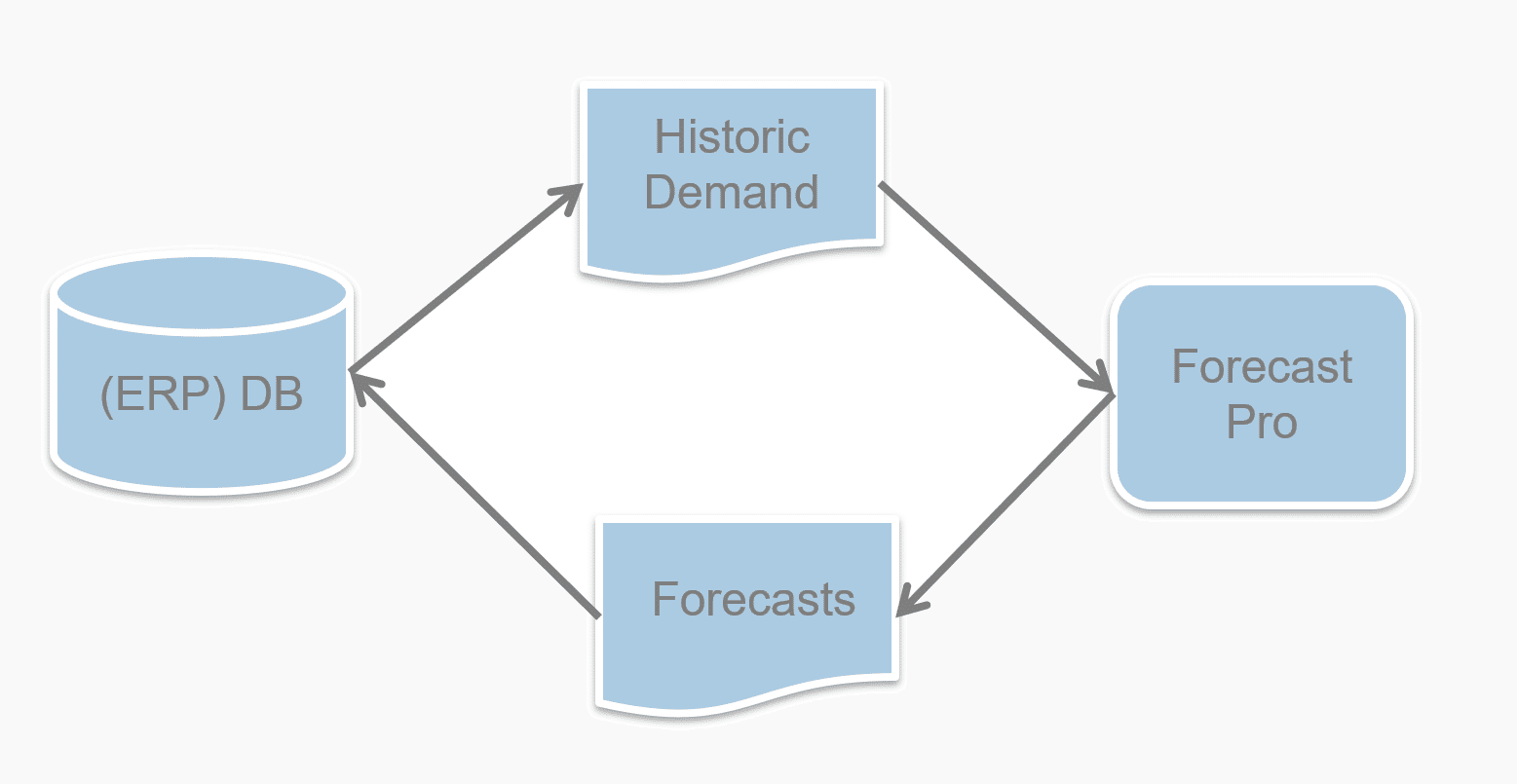
The primary input into Forecast Pro is historical sales data, although other relevant information such as unit of measure conversions, explanatory variables and other forecasts can be imported into the application. The primary output from Forecast Pro is typically monthly or weekly demand forecasts, which often are fed directly into ERP/MRP systems to drive other planning processes. Data input and output are facilitated through either a simple file interface (Excel, CSV or text) or through a direct database connection (ODBC). With more than 12,000 organizations using Forecast Pro, users have integrated Forecast Pro with virtually every system under the sun.

Training & Consulting
Forecast Pro software includes a comprehensive tutorial along with a variety of sample data to assist new users in “learning the ropes.” We recommend that new Forecast Pro users budget for a modest amount of training and consulting in order to get up and running even more quickly. We generally recommend either 10 hours of Web-based training services or 2 days of onsite training for new users. Learn more about these services here.
Our expert trainers tailor these services to meet your specific needs, enabling you both to learn how to use the software and to establish a solid, reproducible forecasting process for your organization.
Technical Specifications
Forecast Pro runs on any Windows-based platform and the application itself has modest requirements. Beyond that, requirements generally scale with the size of the data.
Operating Systems:
Windows (7, 8, 10+)
Hardware:
Pentium-based processor or newer—a minimum of 4-8 GB RAM and 2GB hard drive space is recommended. Forecast Pro can be installed on a client machine or server (including Citrix/Windows Server). Native 32-bit or 64-bit versions are available.

“Forecast Pro is so easy to use that we were able to create forecasts on the first day that it was installed. Within the first year, Forecast Pro helped us to reduce our forecast error to single digits.”
WENDELL HULL
FIDELITY INVESTMENTS

“Forecast Pro is one of the quickest yet accurate forecasting tools that I have ever come across.”
OSMAN MUSTAFA
FRITO-LAY, INC.

“Our forecasts are used for everything from planning/scheduling all the way up to revenue projection by the executive team. We have a full compliment of Forecast Pro products at Oberto.”
ERIC KAPINOS
OBERTO SAUSAGE COMPANY